
RADIUS TOOL
Radius Map Tool: Draw a Mile Radius on a Map
Draw a circle of any radius on a map, in miles, kilometres, feet or air miles. See which towns are inside it, check whether an address falls within the radius, and get a feel for how far that distance really is.
Free, no sign-up · Towns inside the circle · 150 air-mile radius
Draw Your Radius
Tip: click the map to move the centre.
Tap "My location" or type a place to draw the circle and see what is within your distance.
Enter any distance — feet, yards, metres, kilometres, miles or air miles — to draw it as a circle around you or any place, see which towns fall inside, compare it with everyday things, and see how long it takes to walk, cycle or drive.
More distance tools
- Distance as the crow fliesStraight-line distance between any places, with bearing, midpoint and road comparison.
- Google Maps distancePaste Google Maps links or plus codes; step-by-step guide to Google’s ruler.
- How far am I from…Distance from your location to a state, state line, country, city, beach or home.
- Distance to the coastDistance to the sea from any place, height above sea level and a bulk postcode/ZIP checker.
- Halfway pointMeet in the middle by straight line or equal drive time, with cafés and towns nearby.
- Air milesGreat-circle flight distance between airports, multi-leg, with flight time.
- Distance between coordinatesLatitude/longitude in decimal, DMS, UTM; formulas and code snippets.
- Distance between addressesStreet addresses, postcodes and ZIPs; driving mileage and cost.
- Distance between two pointsThe distance formula in 2D and 3D with step-by-step working and a graph.
- Horizon distanceHow far you can see from any height, and what is hidden by the curve.
- Miles ↔ kmLength, speed and running-pace conversions.
7
units, from feet to air miles
172.6 mi
in a 150 air-mile trucking radius
78.5 sq mi
inside a 5-mile radius
0
sign-ups or trials needed
How to draw a radius on a map
Four steps, and you can move the circle at any time.
1
Set the distance
Enter the distance and choose a unit: feet, yards, metres, kilometres, miles, nautical miles or air miles.
2
Set the centre
Use your location, type a town, address, postcode or ZIP, or click the map.
3
See the circle
The circle is drawn on the map. Click anywhere to move the centre.
4
Check a place
Type a place in Is a place inside? to check whether a delivery address or a town is within the radius.
What your radius map shows
Towns inside the circle
Largest first, with each one’s distance from the centre, plus the places near the edge so you know what lies right at the limit.
Inside or outside
A yes or no answer for any place you type, with its distance from the centre.
Size in real terms
Travel times on foot, running, cycling, driving and flying, comparisons with familiar distances, and the circle’s circumference and area.
Map radius calculator: draw a radius around any point
Radius around your current location
Tap Use my location to centre the circle on where you are. It is the quickest way to answer “what is within 10 miles of me?” or to draw a mile radius from your current location.
Radius around an address or ZIP code
Type a street address, UK postcode or US ZIP code to draw a radius from an address, for example a delivery zone around a shop or a catchment around a home.
Radius around a point on the map
Click anywhere, or paste coordinates, to draw a circle around a point such as a trailhead, a mast or a meeting spot. Change the distance and unit at any time.
Does Google Maps have a radius tool?
Google Maps: no radius circle
Google Maps can measure a straight line between points, but it cannot draw a circle of a set radius around a place.
Google My Maps: no true circle
My Maps has no circle tool either, so people trace a rough shape by hand, which is slow and inaccurate for large distances.
This radius map tool
Draws an exact circle on the curved Earth in miles, km, nautical miles or air miles, lists the towns inside and checks whether any place is within the radius. Free, with no account.
Popular radius distances
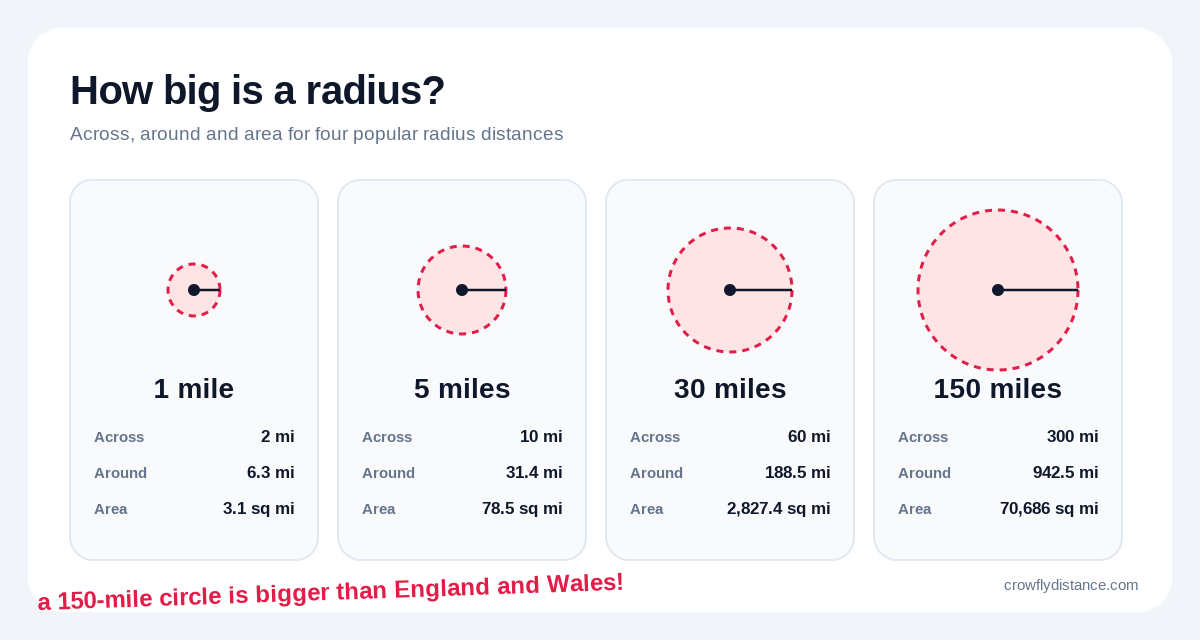
1 mile
About a 20-minute walk at 3 mph. A 1-mile radius covers about 3.1 square miles, roughly a small town centre or a few neighbourhoods.
5 miles
Covers about 78.5 square miles. A common limit for local deliveries, tradespeople and “near me” searches.
30 miles
In a straight line, about half an hour on a motorway or interstate, but the road distance will be longer. The circle covers about 2,827 square miles.
150 miles
A 150-mile circle covers about 70,700 square miles, an area bigger than England and Wales together. Truck drivers often mean 150 air miles, which is longer: see below.
1,000 miles
1,000 miles from New York reaches past Chicago to about Des Moines, Iowa. On a flat web map a circle this big looks stretched, which is explained below.
TRUCKING RULES
150 air-mile radius (FMCSA short-haul rule)
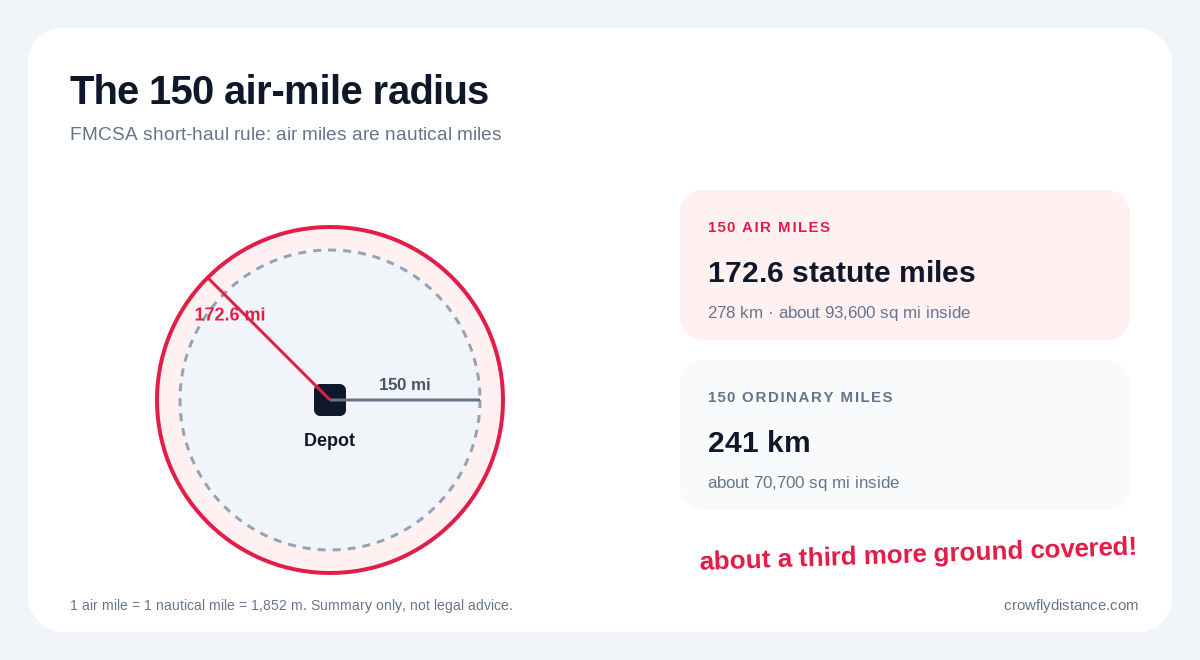
In US trucking rules, an air mile is a nautical mile: 6,076 feet or 1,852 metres. So 150 air miles is about 172.6 statute miles (278 km), measured in a straight line from the driver’s normal work reporting location.
Under the short-haul exception in 49 CFR 395.1(e)(1), drivers who stay within that radius and are released from duty within 14 consecutive hours can use simple time records instead of a full logbook, with at least 10 hours off duty between shifts for property carriers (8 for passenger carriers). Choose air miles as the unit in the tool to draw this radius from any depot.
This is a summary, not legal advice. Check the current FMCSA rules for your operation.
Radius vs driving distance
A radius is a straight-line distance from the centre. A town that is 25 miles away as the crow flies can easily be 30 or more miles by road, and much more if there is a river, lake or mountain range in the way. If you need a driving limit, check the road distance to the places near the edge of your circle.
Why big circles look oval
The circle is drawn on the curved Earth: every point on its edge is exactly the same distance from the centre. Web maps use the Mercator projection, which stretches areas more and more towards the poles, so a large circle in the northern US, Canada or the UK looks taller than it is wide. The shape on screen is distorted; the distances are not.
Radius, circumference and area
For a circle of radius r, the circumference is 2πr and the area is πr².
| Radius | Circumference | Area |
|---|---|---|
| 1 mile | 6.3 miles | 3.1 sq mi |
| 5 miles | 31.4 miles | 78.5 sq mi |
| 10 miles | 62.8 miles | 314 sq mi |
| 30 miles | 188.5 miles | 2,827 sq mi |
| 150 miles | 942.5 miles | 70,686 sq mi |
| 1,000 miles | 6,283 miles | 3.14 million sq mi |
These are flat-map figures. On the curved Earth a very large circle covers slightly less: about 0.5% less for a 1,000-mile radius.
Popular radius sizes
Frequently asked questions
How do I draw a radius on a map?
Enter a distance, choose the unit and set the centre by typing a place, using your location or clicking the map. The circle and the towns inside it appear straight away.
How big is a 5-mile radius?
A 5-mile radius is 10 miles across, about 31.4 miles around, and covers about 78.5 square miles.
What is a 150 air-mile radius?
150 nautical miles, which is about 172.6 statute miles or 278 km in a straight line from the work reporting location. It is the limit in the FMCSA short-haul exception.
What is an air mile?
In FMCSA rules an air mile is a nautical mile: 6,076 feet or 1,852 metres. 100 air miles equal 115.08 statute miles.
Is a radius the same as driving distance?
No. A radius is measured in a straight line. Driving distances to places near the edge are longer.
Why does my circle look stretched?
Web maps use the Mercator projection, which enlarges areas towards the poles. The circle is correct on the Earth; only its shape on the flat map is distorted.
Can I use kilometres or nautical miles?
Yes. The tool supports feet, yards, metres, kilometres, miles, nautical miles and air miles.
Is this radius map tool free?
Yes. Draw as many circles as you like with no sign-up, in miles, kilometres, nautical miles or air miles.
How do I draw a radius around my current location?
Tap Use my location, enter the distance and choose the unit. The circle is centred on your position and the towns inside are listed underneath.
How do I draw a radius around an address?
Type the address, postcode or ZIP code as the centre, then enter the distance. Use Is a place inside? to check whether another place falls within the radius.
Can I draw a radius on Google Maps?
Not as a true circle. Google Maps only measures straight lines, so use this radius map tool to draw the circle and see what is inside it.