
LOCATION FINDER
My Location: Where Am I Right Now?
See your current location on a map with your exact coordinates, street address, ZIP or postcode, county and state — then copy any of it in one tap.
Free · No sign-up · Location is never stored · Works on phone and desktop
What Is My Location?
Find your exact location now: your coordinates, street address, ZIP or postcode, county and state, shown on a map. Nothing is stored.
Tap “Find my location” and allow location access when your browser asks. Your position is looked up once and is never stored on our server. On a laptop without GPS, type an address or ZIP instead.
Address data © OpenStreetMap contributors. US states and counties: US Census Bureau geocoder. UK: postcodes.io (ONS, Royal Mail & OS data, Open Government Licence).
More distance tools
- Distance as the crow fliesStraight-line distance between any places, with bearing, midpoint and road comparison.
- Google Maps distancePaste Google Maps links or plus codes; step-by-step guide to Google’s ruler.
- How far am I from…Distance from your location to a state, state line, country, city, beach or home.
- Distance to the coastDistance to the sea from any place, height above sea level and a bulk postcode/ZIP checker.
- Halfway pointMeet in the middle by straight line or equal drive time, with cafés and towns nearby.
- Radius mapDraw a circle of any radius, list the towns inside it and see how far it really is.
- Air milesGreat-circle flight distance between airports, multi-leg, with flight time.
- Distance between coordinatesLatitude/longitude in decimal, DMS, UTM; formulas and code snippets.
- Distance between addressesStreet addresses, postcodes and ZIPs; driving mileage and cost.
- Distance between two pointsThe distance formula in 2D and 3D with step-by-step working and a graph.
- Horizon distanceHow far you can see from any height, and what is hidden by the curve.
- Miles ↔ kmLength, speed and running-pace conversions.
5
coordinate formats: decimal, DMS, DDM, UTM, Plus Code
±5 m
typical phone GPS accuracy outdoors
US + UK
official county and postcode data
Live
optional tracking as you move
HOW IT WORKS
Three taps, three seconds
1
Tap “Find my location”
Your browser asks once for permission. Say “Allow” — on a phone this uses GPS, on a laptop it uses nearby Wi-Fi networks.
2
We look up the point
Your coordinates go to our server once, are matched against official boundary and address data, and are not stored.
3
Read and copy
You get your coordinates in five formats, your nearest street address, county, state or nation, elevation and accuracy — each with its own Copy button.
COORDINATES
Your location, written five ways
The same spot can be written in several coordinate formats. They all describe one point on the WGS84 globe that GPS uses — they just suit different jobs. The finder above shows all five, so you can paste whichever one an app, a form or a rescue team asks for.
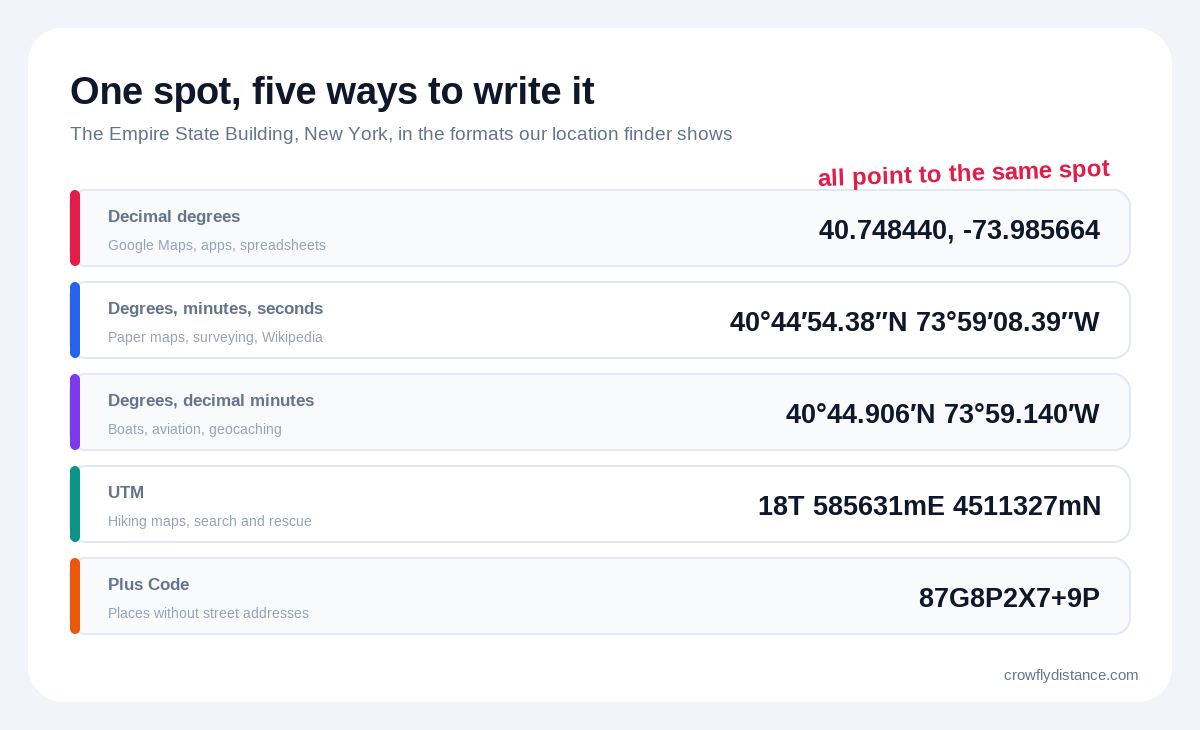
Decimal degrees
The format Google Maps, Apple Maps and spreadsheets use: latitude first, then longitude. North and east are positive; south and west are negative, which is why US longitudes start with a minus sign.
Degrees, minutes, seconds
One degree = 60 minutes, one minute = 60 seconds. Common on paper maps and in Wikipedia. One second of latitude is about 31 m (101 ft).
UTM and Plus Codes
UTM gives metres east and north inside one of 60 zones — handy on hiking maps. A Plus Code is a short code like 87G8P2X7+9P that works where there is no street address.
Need the distance between two of these points? Paste them into our distance between coordinates calculator.
ACCURACY
How exact is “my location”?
Your browser — not this website — works out where you are, and it reports how sure it is. We show that figure as Accuracy and draw it as a blue circle on the map.
| Where you are | What your device uses | Typical accuracy |
|---|---|---|
| Phone outdoors | GPS and other satellite systems | About 5 m (16 ft) under open sky, per GPS.gov |
| Phone indoors or between tall buildings | GPS plus Wi-Fi and cell towers | Tens of metres; reflections can shift the dot |
| Laptop or desktop | Nearby Wi-Fi networks | Usually street level, sometimes a few blocks off |
| No Wi-Fi, no GPS (rare) | Network or IP-based guess | Can be several miles — we warn you when it is over 1 km |
Getting a better fix
- Turn on Wi-Fi even if you are on mobile data — it helps phones and laptops find you faster.
- Step outside or near a window and wait 10–20 seconds, then tap the button again.
- Turn off any VPN: it does not change GPS, but some browsers fall back to IP location behind one.
- On iPhone, check Settings → Privacy & Security → Location Services → Safari Websites → “While Using” with Precise Location on.
USES
When knowing your exact location helps
Meeting someone
Tap “Share my location” to send a Google Maps link, or copy the address into a message.
Deliveries and ride pick-ups
Copy the street address and ZIP or postcode when a driver cannot find you.
Outdoors
Read UTM or decimal coordinates off the page when hiking, fishing or reporting a fallen tree.
On a road trip
Tick “Keep updating as I move” to watch the state, county and nearest town change as you drive.
Forms and claims
Insurance forms, permits and incident reports often ask for coordinates or the county.
Emergencies
Call 911 (US) or 999 (UK) first — phones send your location to the call centre automatically. Use this page if you are asked to read your position out.
Your location stays yours
We never ask for your location until you press the button, we do not save it, and we do not use IP tracking. Lookups are rounded and cached anonymously so repeat visits are fast.
Where the answers come from
US states and counties: the US Census Bureau geocoder. UK postcodes, councils and counties: postcodes.io (ONS and Ordnance Survey open data). Street addresses: OpenStreetMap. Elevation: Open Topo Data.
MORE LOCATION TOOLS
Keep exploring
What state am I in?
Your state, county and the nearest state line.
What county am I in?
Official county from Census boundaries.
What is my address?
Your street address and ZIP or postcode.
How far am I from…?
Distance from you to any place, state or the beach.
Distance between coordinates
Paste two lat/long points for the exact distance.
Frequently asked questions
What is my current location?
Tap “Find my location” at the top of this page and allow location access. You will see your latitude and longitude, your nearest street address, your city, county, state or nation and your ZIP or postcode, plus a map pin. Nothing is saved.
Why does it say my location is approximate?
Your browser reports how accurate its fix is. If it is worse than 1 km (0.6 miles), the device could not use GPS or Wi-Fi and fell back to a rough network guess. Turn on Wi-Fi or move outdoors and try again.
Is it safe to share my location with this site?
Your position is sent once to look up the address and boundaries, then discarded. We do not store it, track you, or use your IP address to locate you. You can also type an address instead of sharing.
How do I find my coordinates on my phone?
Open this page on your phone, tap “Find my location” and allow access. Your coordinates appear in decimal degrees, degrees-minutes-seconds and UTM. Tap Copy next to any of them.
Can it follow me as I move?
Yes. Tick “Keep updating as I move”. The pin follows you and the address, county and state refresh after you have moved about 150 m (500 ft). Keep the page open — browsers pause location in background tabs.
Does it work outside the US and UK?
Yes. Coordinates, the street address, region and country work worldwide. Official county data comes from the US Census Bureau for the US and from ONS data for the UK.
Why is the address slightly wrong?
Turning coordinates into an address (reverse geocoding) picks the nearest mapped address or street. In rural areas, large buildings or new developments it can be a few doors or a block away. The coordinates themselves are what your device measured.